
Navigator Software 5.0
NAV Control Center 5.0
- Hierarchical management for Navigator Corporate servers
- Manage up to 4096 NAV Corporate servers
- Centralized user management database up to 512 user groups and 1000 users per group
- Centralized view groups management database for Navigator Clients up to 144 channels per group
- Pre-configured video groupings for user login
- Support spot monitor for view different group
- Support AI recognition and behavior detection
- Assign specific camera to NAV server for recording
- Remote multiple channels playback and backup
- Centralized event, alarm, and operation status report management for Navigator servers
Overview
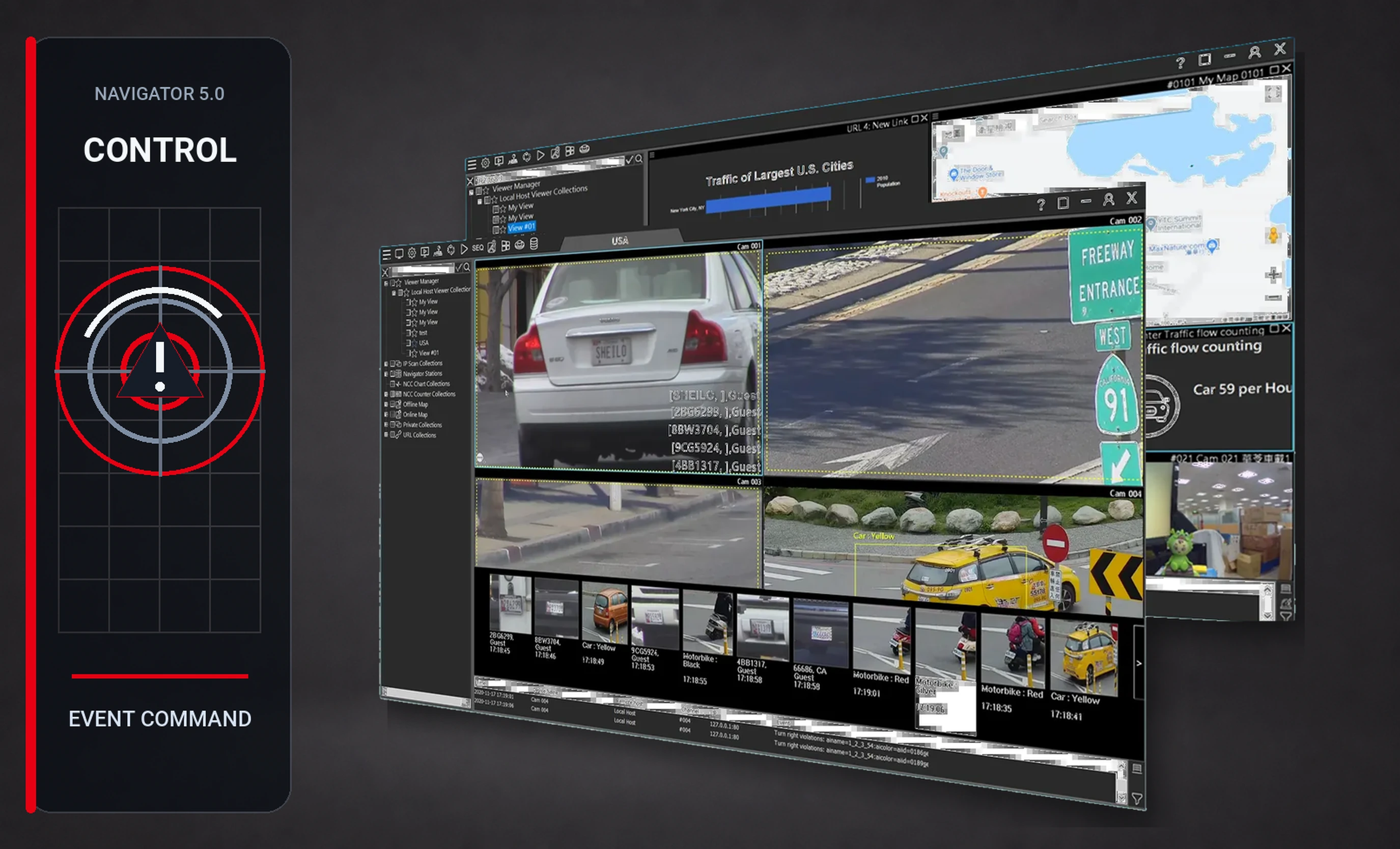
The NAV Control Center is a centralized video management software supporting up to 64-layer hierarchical management of 4096 NAV servers and 65000 IP cameras, PTZ domes and DVR/DHD/NVR devices. Real-time monitoring delivers up to 144 channels per monitor at 12M resolution, with simultaneous playback of up to 36 channels. Customizable split screen layouts, multi-monitor TV walls, smart search, map markers and optional facial recognition and license plate recognition are supported. System requirements are Windows 10/11 IoT Enterprise or Server 2012R2/2016, Intel Core I5-8500 or above and 16GB RAM. Tree-Structured Hierarchy Navigator's core design model: centralized hierarchy from enterprise level through sites, groups, and cameras NAV Control Center 5.0 Management Tree ▼ Enterprise Group 1 enterprise ▼ Management Levels Up to 64 levels, 64 NVRs each ▼ NAV NVR Servers Up to 4,096 units ● Video Sources Up to 65,000 channels ● Live Split View Up to 144 channels per screen ▼ TV Wall Management Up to 199 wall spaces ● Remote Monitors Up to 1,440, 144 per wall ▼ User Groups Up to 512 groups ● Users Up to 1,000 per group Core Features Tree-structured central management with up to 64 hierarchy levels Single platform connects more than 4,096 NAV Corporate NVRs 512 user groups with up to 1,000 users each Centralized channel groups displaying up to 144 live or recorded channels per monitor Pre-assign shared channel group configurations to users Multi-monitor and TV wall management support Receives and leverages AI recognition and behavior analytics events Multi-channel synchronized playback and backup Key Features View Manager Unified interface manages recordings and live video. Filter by events, cameras, time, location, and more, then generate statistics or view on eMap. Online eMap Display recordings or live video directly on electronic maps, simple and intuitive. Support up to 128 online maps, 1,024 cameras per map, and 64 pop-up windows per map. Event Search & Playback Check AI event logs and quickly search and play back related video by AI events, accelerating incident investigation. Chart Build custom dashboards with HTML5 statistics, up to 64 charts embeddable on camera canvas. Counter Count people and vehicles, up to 64 counters embeddable on camera canvas for live or recorded streams. URL Channel Embed web services such as access control, facial recognition, VSaaS, and online streaming, all in one platform. Spot Monitor Dedicated monitors for viewing different camera groups, ideal for large control center environments. Private Collections Manually add devices via public IP address: external cameras and internal devices in one platform. Deployment Scenarios Large Control Rooms TV walls with Spot Monitor multi-display output let each operator monitor assigned channel groups by permission. AI events surface in real time, and up to 36-channel synchronized playback speeds up review. Multi-Site Enterprises Headquarters manages recorders across every site on a single platform. The tree hierarchy mirrors your organization, with delegated access for regional and site managers and centralized cross-site retrieval. City-Scale Projects Integrates up to 65,000 channels of video sources across districts, connects to existing LDAP / AD accounts, and maps cameras to intersections and stations on eMap for instant event locating. Typical deployment: NAV series recorders running Navigator VMS as recording nodes, centrally managed by NCC. Specifications Operating systemWindows 10 & 11 IoT Enterprise 22H2 GAC 64-bit (Pro or above), Windows Server 2012R2, 2016 Max. live channels1–144 (split screen, user-defined) Multi-level managementTree-structured management, up to 64 levels with up to 64 NVRs per level NAV server managementConnects more than 4,096 NAV Corporate NVRs Network device managementManages up to 65,000 channels of LILIN IP cameras, PTZ cameras, DVR / NVR / DHD, and NAV LIVE servers User groupsUp to 512 user groups with up to 1,000 users each LDAP / AD user managementSupported Video inputLILIN IP cameras (incl. HTTPS), fisheye cameras, PTZ cameras, DVR / NVR / DHD, NAV live streaming, P2P live streaming, ONVIF IP cameras Dual-stream decodingD1 decoding in split view / full-screen 1080p / 3M / 4M / 5M / 8M / 12M decoding AI event search & playbackSupported Fisheye dewarpingSupported, 4-channel split CountersUp to 64 counters embeddable on camera canvas Statistics chartsHTML5 charts, up to 64 embeddable on camera canvas Multi-channel playbackUp to 36 channels of synchronized playback TV wall management1–1,440 remote physical monitors; 199 wall spaces, each freely tiled with up to 144 monitors Minimum hardwareIntel Core i5-8500 or higher / DDR4 16GB RAM or more / Intel HD630 or GTX 1650 4GB or higher / 1GbE NIC recommended LanguagesEnglish, Traditional Chinese, Simplified Chinese, Japanese, German, French, Russian, Spanish, Vietnamese, Portuguese, Italian, Slovenian, Czech, Hungarian, Turkish, Arabic, Persian, Bengali, and more
Specifications
| Supported OS | "Windows 10&11 IoT Enterprise 22H2 GAC 64bit ( Professional above), Windows Server 2012R2, 2016" |
|---|---|
| Numbers of live channel supported | 1 ~ 144 |
| Split Screen | 1~144, User-defined |
| Tier Architecture Administrative System | Support multi-layer tree structure management system, up to 64 layers, each layer can support up to 64 NAV servers |
| IP Scan | Quick IP device search and configuration |
| Video input | LILIN IP camera, LILIN IP camera via HTTPS, LILIN Fisheye camera, LILIN IP speed dome, LILIN DVR/NVR, LILIN DHD recorder, NAV live streaming, P2P live streaming and ONVIF camera |
| LDAP/AD User Management | Supported |
| Grouping setting | 512 groups supported and each group can support 1000 users |
| NAV Recorder Management | Manage up to 4096 NAV Corporate servers |
| IP Device Management | Simultaneously controls up to 65000 LILIN IP cameras, IP speed domes, DVR/DHD/NVR and NAV Live servers |
| AI Event Search and Playback | Supported |
| Web browser | Edge |
| Interface Language | English, Traditional Chinese, Spanish, German, French, Russian, Japanese, Portuguese, Italian, Simplified Chinese, Slovenian, Czech, Hungarian, Turkish, Arabic, Persian, Bengali, Vietnamese |
| Authentication | Camera feature access permissions limited |
| Local Server Backup | ViewManager camera settings, User Accounts, ANPR plate list, Facial Recognition list, NAV camera settings and eMaps |
| Remote Server Backup | Backup data from NAV to NCC or restore data from NCC to NAV. |
| Sync Server Setting | Synchronize user accounts, NAV camera settings, facial recognition lists, license plate recognition lists, ViewManager camera settings, emap settings, and remote group names. |
| Add NAV Server Function | Manual |
| Assign Specific Camera View to NAV Server for Recording | Supported |
| Advance Alarm DO Setting | Supported |
| Advance Alarm DO Shortcut on Viewer Manager | Supported |
| Add LPR Camera | Supported |
| IP Device Management | Simultaneously controls up to 65000 LILIN IP cameras, IP speed domes, DVR/DHD/NVR and NAV Live servers |
| Supports (Video Input)/Network video /IP video | LILIN IP camera, LILIN IP camera via HTTPS, LILIN Fisheye camera, LILIN IP speed dome, LILIN DVR/NVR, LILIN DHD recorder, NAV live streaming, P2P live streaming and ONVIF camera |
| Camera Status Management | Camera connection established, authentication successfully, live view established, and recording status displayed |
| Camera Preview | Supported |
| Batch IP Cameras Settings | Camera name |
| Playback compression | H.265/ H.264 /JPEG |
| Dual stream technology (Video output) | Multi division view uses D1 decoding and full screen supports 1080p/3M/4M/5M/8M/12M decoding |
| Camera name | 20 characters |
| Camera View Group | Drag and drop, DVR/DHD/NVR channels auto import and channel switching |
| View Group Channels | Up to 144 simultaneous display (Depends on the server hardware and network bandwidth performance) |
| Camera view group | User defined and the group permissions can be configured based on user accounts |
| OSD (On-Screen Display) | People counting/Object counting/Tripwire detection/License plate/POS string |
| Spot Monitor | Live sequence display and playback are supported |
| ViewManager lock screen | Supported |
| Fisheye software decoding function (real-time image) | 4 channels split supported |
| Fisheye Dewarp | Immervision lens supported |
| Fisheye Dewarp Mode | (Ceiling and ground mounted) 1R One Region, 3R1O Three Regions One Fisheye, 4R Four Regions, 2R1P Two Regions One Panoramic 360 , 2P Two Panoramics 180, 8R1O Eight Regions One (Fisheye Wall mounted) 1R One Region, 3R1O Three Regions One Fisheye, 4R Four Regions, 2R1P Two Regions One Panoramic 180 , 1WP One Wall Panoramic 180 , 8R1O Eight Regions One Fisheye |
| NVR P2P connection | Supported |
| Edge IVS & edge people counting | Supported |
| Video is in processing | Customized |
| Corridor mode | Support (IPCAM) |
| Digital zoom | Yes, ePTZ supported for live and playback |
| PTZ Presets Naming | Supported |
| PTZ Control | Supported using a mouse to zoom in/out or move the live image |
| Sequence Mode | Supported |
| Snapshot | Supported |
| Screen Events | Screen/network disconnection |
| Audio | PCM/G.711/AAC live monitoring (one-way audio) |
| eMap Live Monitoring (offline) | Up to 64 live images from IP cameras, DVR or NVR in each map at the same time |
| (eMap)Offline Maps | Up to 128 offline maps(JPEG) |
| Online map services | Both Google Maps and Baidu Maps are supported. GCJ-02(Mars Coordinates), BD-09(Baidu coordinates), WGS-84(World Geodetic System) |
| eMap Live Monitoring (online) | Up to 64 live images from IP cameras, DVR or NVR in each map at the same time |
| (eMap)Online Maps | Up to 128 online maps |
| eMap marker (offline) | Up to 256 camera marks per offline map |
| eMap markers (online) | Up to 1024 camera marks per online map |
| Snapshot | Motion detection /external alarm /audio detection /face detection /face recognition /license plate recognition |
| GPS | Support for GPS fleet movement tracking and map tracking, real-time traffic conditions on maps, and playback functionality. |
| Central counter (traffic behavior) | Detection Zone, Parking Space Counting, Zone with Dwell/Parking Violation Tripwire / Traffic Flow, Left-turn Detection, Right-turn Detection, Wrong way Detection, Left-turn Violation, Right-turn Violation, Queuing Detection, U-turn Violation, Left-turn Violation on Red Light, Right-turn Violation on red light |
| Central counter (automatic time range) | Yes, resetting time cycle and automatic reset range are available. |
| Limit of counter | Can be embedded into the camera canvas and support up to 64 groups |
| Limit of Statistical Chart | Statistical charts in HTML5 format, which can be embedded into the camera canvas and support up to 64 groups |
| Statistical chart category | Bar Chart, Line Chart, Pie Chart, Stepped Chart |
| Central control statistics (duration) | 1, 4, 12 hours, 1 day, 1 week |
| Central control statistics (traffic behavior) | Detection Zone, Parking Space Counting, Zone with Dwell/Parking Violation Tripwire / Traffic Flow, Left-turn Detection, Right-turn Detection, Wrong way Detection, Left-turn Violation, Right-turn Violation, Queuing Detection, U-turn Violation, Left-turn Violation on Red Light, Right-turn Violation on red light |
| Center Control Statistics (Vehicle Type) | Person, Bicycle, Car, Motorbike, Bus, Train, Truck, boat, TUK TUK, Truck Trailer, Pickup Truck, Fire Engine, Sedan, Van |
| Alarm Triggering | PC alarm sound, designated IP camera alarm DO output, eMail photo output, PTZ preset point output, notification TV wall projection, eMap marker display |
| Database Manager | Various alarm events, screen/network disconnection, login and logout, operation event table |
| NAV Operation Status | NAV host maintenance status |
| Alarm Output | Support third party brands via TCP/IP network control output |
| Number plate recognition | Optional |
| Facial Recognition | Optional |
| Video decoder | LILIN VD022 for video wall |
| Physical Monitors | Up to 1440 physical remote monitors supported by network (based on number of video output available on external graphic card from dedicated server) |
| Rooms of the Wall | 199 rooms supported for various monitor layouts |
| Video Wall Monitor | Each room can allocate up to 144 monitors to be combined freely |
| (TV Wall)Channel groups | 128 channel groups per room allowing different channel layouts to be arranged on the same video wall surface. |
| (TV Wall) Import View From Client to TV Wall | Support View Manager canvas template |
| Video Channel | Up to 144 channels per TV wall group |
| TV Wall | Up to 144 channels per monitor, resolutions up to 12M |
| Display One Camera Over Several Monitor | Supported |
| Sequence Mode | 32 groups supported in max |
| Playback Speed | Fast Rewind: 1/8, 1/4, 1/2, 1X, 2X, 4X, 8X, 16X, 32X Slow Rewind:-1/8, -1/4, -1/2 Fast Forward: 1/8, 1/4, 1/2, 1X, 2X, 4X, 8X, 16X, 32X Slow Forward: 1/2, 1/4, 1/8 |
| Playback Search | Remote and local server for time search, Alarm search, POS search, ANPR search, Face recognition search, Face search using image (In Face recognition server only), AIDA search |
| Playback Tagging (Playback) | H.265/ H.264 /JPEG |
| Multiple Playback | Up to 36 channels playback simultaneously |
| Multiple channel playback | Up to 36 channels playback Simultaneously (Depends on the hardware and network performance) |
| Asynchronous Time Playback for Same Camera | Playback at different time points |
| Remote playback | Remote multiple channel playback for SD card, DVR/DHD/NVR, and Navigator server |
| Instant Playback | Quick playback of the last 5 minutes |
| Remote NAV Instant Video | Multiple megapixel or D1 connections |
| Remote DVR/DHD/NVR Video Playback | Supported NAV server/DVR/DHD/NVR/IP camera SD card etc. Up to 36 channels of simultaneous playback and backup |
| Backup / Playback (Software) | NAV/DVR/DHD/NVR remote file download and saves to AVI or MP4 file format. JPEG snapshot also supported. |
| Account Freeze Scheduling | Supported |
| User Group Management | 512 groups supported and each group can support 1000 users |
| Access right manageable | Supported |
| Camera access and function | Supported |
| Quick device search | Supported |
| Sync with this machine | Supported |
| Sync with this remote | Supported |
| Database | Database import and export, CVS report import and export |
| Database Filter | User log report, event report, POS event report, ANPR event report, object counting report, AI event report, NAV server Status, GPS report, Face recognition report, Server report |
| IVS Statistics | Supported |
| Fast playback of events | Supported |
| (DB Manager)Central management | Event logs from multiple stations |
| Access log | Complete user access login operation table list |
| Startup setting | When the NCC system starts, this program automatically opens. NCC auto login and automatically executes View Manager (full-screen mode), Alarm Manager, TV Wall and eMap. |
| Screen Saver | Live image, playback and key frame decoding |
| Scale prompt | 2x larger font size for message is supported |
| Prompt AI objects and text OSD | Supported |
| GPU Decode | GDI, Intel GPU and Nvidia GPU (Depends on the hardware or bandwidth performance) |
| Connect Mode | Direct NVR/Camera streaming mode or NAV relay streaming mode |
| Streaming Mode | Single stream, dual stream and low bandwidth stream |
| Languages | English, Traditional Chinese, Spanish, German, French, Russian, Japanese, Portuguese, Italian, Simplified Chinese, Slovenian, Czech, Hungarian, Turkish, Arabic, Persian, Bengali, Vietnamese, Polish |
| Alarm snapshot path | Customer Defined |
| Snapshot path | Customer Defined |
| Playback Time | Up to 24 hours |
| Anti-aliasing mode | Supported |
| System Backup | Local backup, remote backup, data restore to remote device |
| System Reboot Setting | Instant, Reboot at system reboot time |
| Memory Management | System memory usage limit, Mosaic TV Wall memory usage limit, Control Center memory usage limit, View Manager memory usage limit, eMAP Center memory usage limit, Alarm Center memory usage limit. |
| System Limit Setting | Limit max CPU usage |
| LPR System | Optional |
| Facial Recoginiton System | Optional |
| AMBER Alert | Optional |
| CPU requirement | Intel Core I5-8500 or abore (Depends on the server hardware and network bandwidth performance) |
| RAM requirement | DDR4 16GB or above |
| GPU Minimum Requirement | Intel HD630 or GTX 1650 4GB or above |
| Network Interface Card | 1GbE recommended or above |